
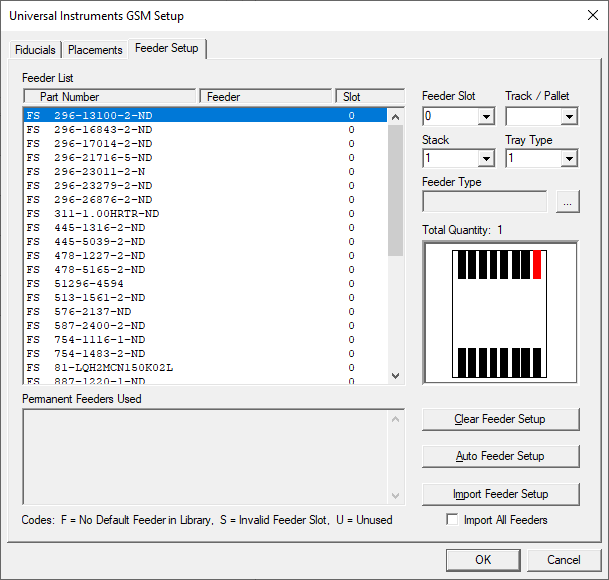
The Feeder Setup tab is used to set up the feeders for a board run. You can have FactoryLogix set up the feeders for you automatically or you can set them manually.
|
Option |
Description |
|---|---|
|
Feeder List |
Displays all feeders by part number, feeder, and slot. |
|
Feeder Slot |
Associates a slot to the selected part number. |
|
Track/Pallet |
Associates a Track/Pallet to the selected part number. |
|
Stack |
Specifies the stack for the selected part number. |
|
Tray Type |
Specifies the tray number/type for the selected part number. |
|
Feeder Type |
Specifies the feeder type for the selected part number. Select the ellipsis (...) button to display a dialog where you can select a different feeder type for the selected part number. |
|
Total Quantity |
Displays the total quantity of the selected part number. |
|
Clear Feeder Setup |
Allows you to delete all feeder setup information previously associated with each part number. |
|
Auto Feeder Setup |
Allows you to automatically assign a feeder to each part number for this board run. |
|
Import Feeder Setup |
Allows you to import feeder setup information. |
|
Import All Feeders |
Select this check box to import all feeders for the selected part number. |
|
Error Codes |
F=No default feeder is specified in the library. S=Invalid feeder slot. U=Unused feeder. |