
Add a quality sampling plan
Sampled inspection or sampling plan is a process where predefined rules determine a quantity of parts that must be inspected before the parts can be added to stock.
You can create multiple sampling plans for different types of parts in FactoryLogix based on the criticality of quality. For example, parts used to build a child's toy may not need a strict incoming inspection strategy while parts used to build an implantable medical device such as a pacemaker would require very strict inspection processes.
Sampled inspection in FactoryLogix uses three different sampling plan types; each base plan type has configuration options that you can adjust to achieve a particular Acceptable Quality Limit (AQL). In addition, you can utilize switching rules to automatically loosen or tighten quality requirements based on a vendor's prior quality history.
Once defined, you can link sampling plans to specific vendors and/or receiving processes.
Supported sampling plans
FactoryLogix supports the standard sampling plan types described in the following table.
Standard | Description |
|---|---|
MIL-STD-105E (ANSI/ASQ Z1.4) | MIL-STD-105E is a United States defense standard that provided procedures and tables for sampling by attributes based on Walter A. Shewhart, Harry Romig, and Harold Dodge sampling inspection theories and mathematical formulas. Widely adopted outside of military procurement applications. The last revision was https://archive.org/details/MIL-STD-105E_1 . 1 |
MIL-STD-1916 – Accept on Zero (c=0) | MIL-STD-1916 is a United States defense standard that contains Accept On Zero (AOZ) plans for attributes, variables, and continuous sampling. |
Squeglia Zero-Based Plan | The Squeglia Zero-Based sampling plan requires far less inspection than the corresponding ANSI/ASQ Z1.4 (formerly MIL-STD 105) plan and becomes viable when the supplier is extremely confident in its level of quality.1 |
Simple Sample | A Simple Sample plan is a subset of a statistical population in which each member of the subset has an equal probability of being selected. A simple sample is meant to be an unbiased representation of a group. Simple (random) sampling extracts a research/study sample from a larger population. Selecting subjects completely at random from the larger population also yields a sample that is representative of the group being studied. Example: Choose the names of 25 employees out of a hat from a company of 250 employees. In this case, the population is all 250 employees, and the sample is random because each employee has an equal chance of being chosen. |
Add a sampling plan
Log into FactoryLogix Office.
Select Templates and Standards
 > Define Sampling Plans.
Select the New
 button, then select base plan type from the drop-down.
Enter a Name for the new plan.
The top half of the window contains Sampling Plan Details settings; the bottom area contains a chart specific to the plan type and options you selected.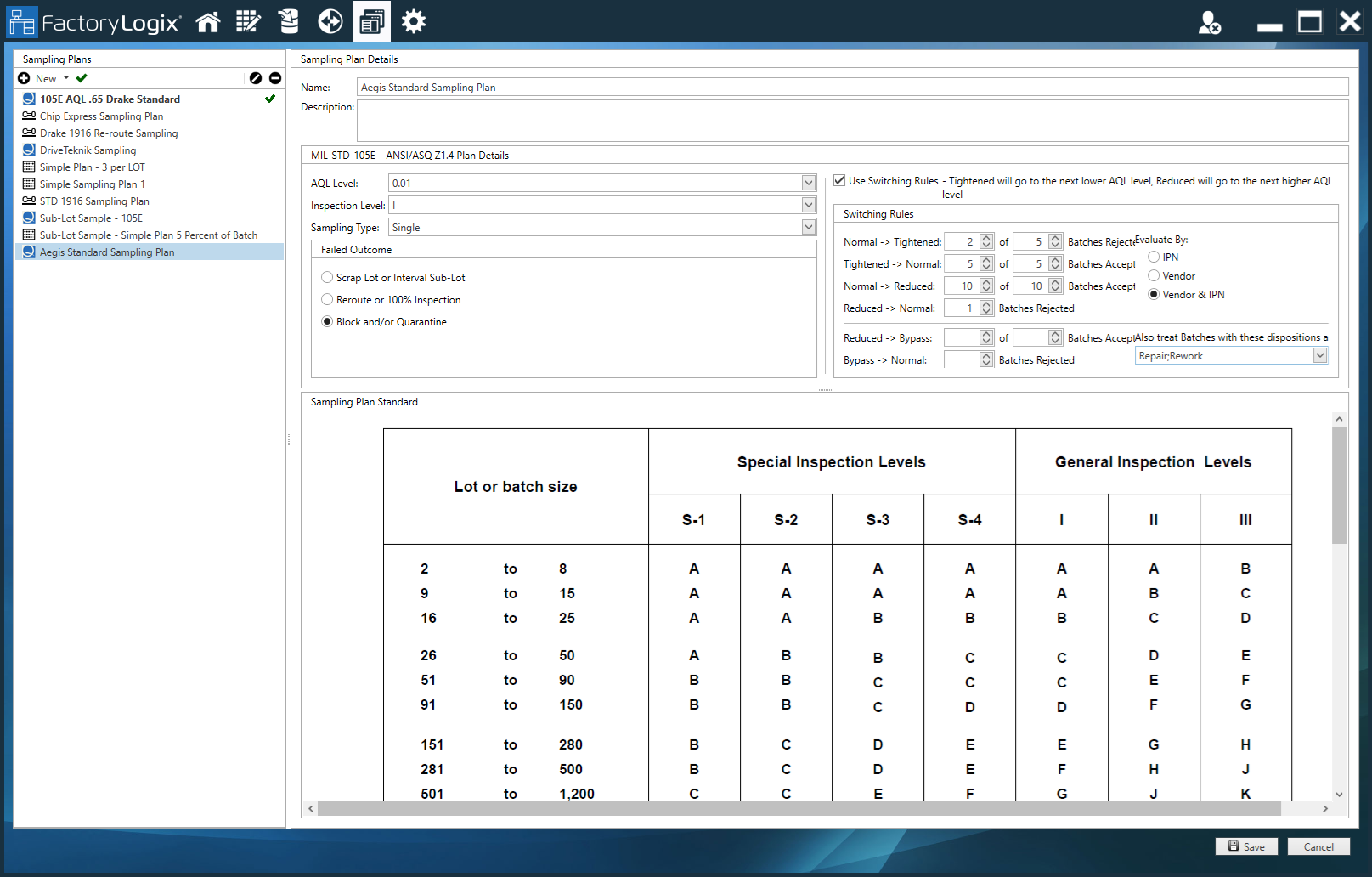
Select other sampling plan details as needed (see Add a quality sampling plan | Failed-outcomes for more information about failed outcome options).
Select Save to save the new sampling plan.

Note
After you specify an Acceptable Quality Limit (AQL), you can use the chart at the bottom of the window to determine a sample size from the specified lot/batch size. The charts are present simply for reference. Decoding and using these charts is handled by FactoryLogix based on the AQL and inspection level you specify.
Failed outcomes
When defining sampling plans, there are three types of failed outcomes you can specify to determine what happens during a Smapled Inspection operation.
Scrap Lot or Interval Sub-Lot - The sampled inspection proceeds normally until the lot or sub-lot passes or fails. If a lot or sub-lot fails, all units in the sub-lot will be scrapped.
Reroute or 100% Inspection - The sampled inspection proceeds normally until the lot or sub-lot passes or fails. If a lot or sub-lot fails, all units in the sub-lot will be 100% inspected.
Block and/or Quarantine - Enables FactoryLogix to quarantine all processed units at the current sampled operation. When this mode is triggered, the system does the following:
Sends all affected units to quarantine
Changes sampling to tightened mode
Resets the sampling counts
Note
The Block and/or Quarantine failed outcome setting applies to all sampling plan types available in FactoryLogix and applies to both production and receiving batches.
Failed batch behavior in FactoryLogix Operations
In FactoryLogix Operations, when a blocking mode that includes quarantine is configured, the system moves all units in the failed batch or sub-lot to the selected out-of-route operation and starts and pauses them at that operation. This behavior prevents the units from being used in any in-route process flow operation until the quarantine is resolved and the units are unblocked. If the configured re-route operation does not exist, the system does not reroute the units—instead, the units remain at the current operation in the Paused state.
When a sampling plan uses the Block and/or Quarantine failed outcome and the system determines that a batch or sub-lot has failed, the system must process all units in the failed batch or sub-lot according to the configured blocking settings.
Quarantine processing
If the Blocking Mode setting includes Quarantine, the system must do the following:
Move all units in the failed batch or sub-lot to the configured out-of-route operation
Start and pause the units at that operation
This process prevents the units from being used in any in-route operation until the quarantine is resolved and the units are unblocked.
Missing reroute operation
If the configured re-route operation doesn’t exist when rerouting is required, the system must do the following:
Leave the units at the current operation
Set the units to the Paused state
Prevent rerouting from occurring
Quality sampling plan example
Using the MIL-STD-105E plan with an AQL of 1.5, an inspection level of 1, and a single sampling type (as opposed to double), the chart will dictate sampling sizes per batch.
With a lot/batch size of 100 units, start at the top of the chart with the General Inspection Levels area, numeral 1. Follow that column down to find the letter that corresponds to a batch size of 100, which will be D.
Proceed to the lower half of the chart and find the sample size associated with the letter code D (in this case, 8 pieces). Follow that row to the right until you reach the column for the desired AQL Level (1.5) and find the accept/reject values.
In this example, the acceptable number of defective units out of the sample is 0—the entire batch should be considered failed if even one defective item is found in the sample of 8.
The Failed Outcome setting in the top portion of the window dictates what happens in the event of the limit being reached—either the entire batch gets scrapped, or the batch switches to 100% inspection instead of a sampled inspection.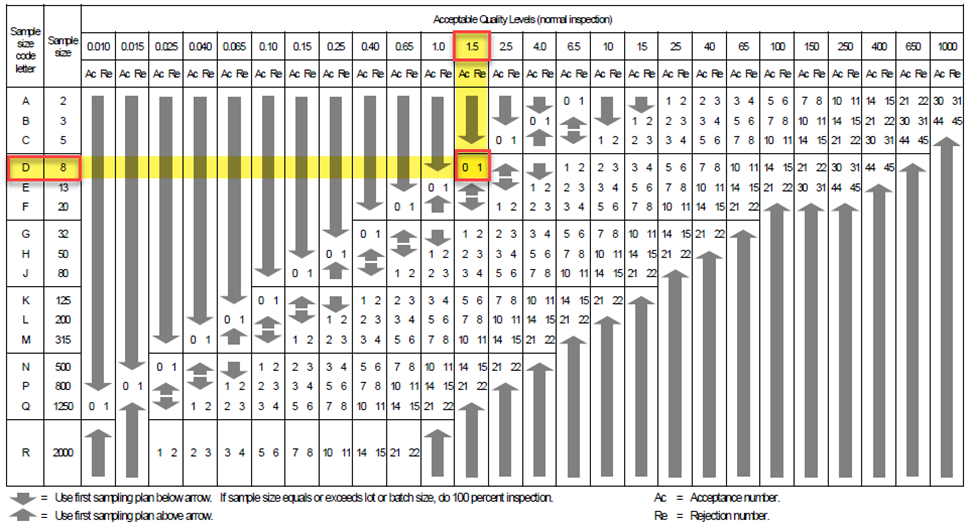
Switching rules
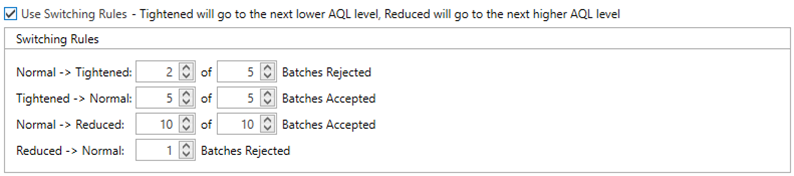
Switching Rules can adjust the AQL level to the next higher or next lower level based on historical performance. When enabled, you can establish rules to dictate when the switching rules are adjusted. In the following example, the Normal sampling rules will automatically switch to Tightened if just 2 out of 5 sequential batches fail a sampled inspection. If 5 out of 5 batches pass, the rules will be returned to normal.
1 Source: Wikipedia